ProductionPro: Oil & Gas Field Data App
Oil and gas lease operators, pumpers who drive from well to well checking on production, have recorded everything on paper: tank levels, meter readings, how much crude a truck picked up. The paperwork gets transcribed later, usually by someone who wasn’t at the well site, and errors compound at every handoff.
ProductionPro (ProductionPro LLC, Plano, TX) brought that workflow onto a handheld tablet. CimpleO built the Android app.
The Challenge
A pumper’s daily route touches dozens of leases, each with its own wells, tanks, and meters. The app had to work offline in the field, since cell coverage on a lease is unreliable, and still keep every reading tied to the right well, tank, and timestamp once it synced. It also had to support the specific paperwork of the business: tank gauge readings, meter readings, run tickets for crude hauled off-site, and disposition records for where that crude went.
None of this maps to a generic forms app. A tank gauge entry needs open/close volumes and a BS&W (basic sediment & water) reading: a real oilfield measurement, not something invented for the app. A run ticket has to reconcile against the tank it was drawn from. Contacts and companies needed their own hierarchy, since a single lease can have multiple working interest owners to notify.
What We Built
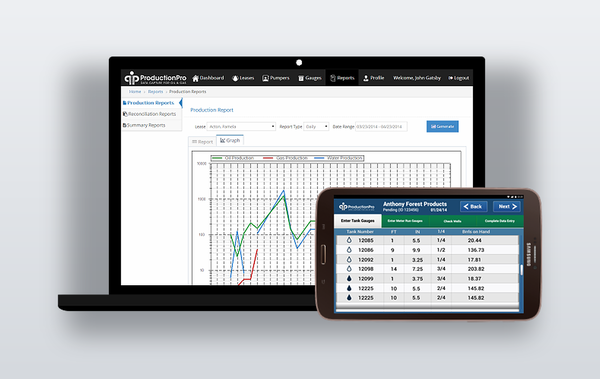
Field data entry. Screens for entering tank gauges, meter readings, and run tickets, each scoped to a specific lease, well, and tank. A 45-day rolling calendar on the entry screen color-codes each day red, yellow, or green as gauges get completed across a pumper’s leases, so a pumper (or the office, looking at the same calendar on the web dashboard) sees at a glance what’s outstanding. A rewrite-gauges flow lets corrections happen after the fact without breaking the audit trail: the app saves the corrected entry as a new numbered revision (-r1, -r2…) stamped with the original report date, not the correction date, and the full revision history stays visible in Gauge History.
Lease and asset hierarchy. Leases contain wells; wells feed tanks; tanks get read by gauges and drained by run tickets. The data model (lease, wells, tank, tank_height, gauges, meter_data, meter_run) mirrors how the business is structured on the ground, not a flattened list of “sites.” A pumper can be linked to more than one operating company at once: login returns an array of companies, each with its own access token, so the same device serves a contractor pumping for several operators.
Disposition and hauling. A disposition screen tracks where hauled crude went, naming the buyer and the truck, and closes the loop from tank to sale. Tank pickup and history views give the office visibility into every pull without a phone call to the field.
Contacts. A separate contacts and companies module, with per-lease contact assignment split by contact type (oil buyer, gas buyer, application support, tablet hardware support), so the right dispatcher or support line surfaces automatically instead of a pumper hunting for a phone number.
Task dispatch. Beyond gauges, the office can push work orders straight to a pumper. GetTasks pulls open tasks across all of a pumper’s leases for the next 14 days, each flagged important or not, and ChangeTaskStatus lets the pumper mark one assigned, completed, or dismissed. The server rejects the update if the task was already claimed by someone else, already closed, or cancelled from the office in the meantime.
Production reporting. GetProduction returns 45 days of daily oil, water, and gas volumes per lease, feeding the Lease Daily Production screen: a swipeable, day-by-day production graph a pumper checks in the field, backed by the same numbers the office sees in the web dashboard’s production reports.
Offline-first sync. Built on Titanium Alloy and shipped on Samsung Galaxy Tab hardware chosen for field use. The app caches every gauge, meter reading, and history entry in a local SQLite database (Ti.Database); a FirstStart sync module and a cold_start model reconcile that local store against the company’s REST API whenever the connection comes back, deleting and rewriting individual gauge rows rather than blowing away the whole cache. The API itself is POST-only with a JSON envelope ({success, errorMessage, data}) and supports conditional fetches on the heaviest endpoints (GetLeases, GetGauges, GetContacts, GetRunTicketPhoto) via Last-Modified/If-Modified-Since headers, so a pumper’s tablet re-checking on a bad connection gets a 304 Not Modified instead of re-downloading everything.
Push-triggered sync. The office doesn’t have to wait for the next scheduled sync. ProductionPro uses GCM to push a command straight to a device (GetGauges, GetContacts, GetLeases, GetDeviceState), and a CommandManager on the phone runs the matching update the moment the push lands. No app restart required.
Remote device lock. If a phone is lost or a contractor’s access needs to be pulled, the office flags the device server-side. The next GetDeviceState check calls an IsBlocked endpoint, which fails with a dedicated error code (9898, “Device is locked”) instead of a generic error; the app responds with a full-screen lock notice and a disabled Android back button, so the device stays unusable until the office clears it.
Remote diagnostics. Every device can have its logging verbosity set remotely: ErrorLevel tells a specific device (by device ID, make, and OS version) whether to run at Debug, Info, Warning, or Error level, and SendError ships that device’s error log back to the server. Support can turn up logging on one pumper’s tablet in the field without a site visit.
Environment switching. A settings screen lets a device point at the production API, a staging environment, or a custom server, with SSL validation toggled per environment. The same build supported active development, client QA, and the live fleet in the field at once.
Delivery
The app shipped in three months (April–July 2014) across 612 commits, with feature branches for gauges, contacts, and background sync developed in parallel and merged back to master. Acceptance testing ran in parallel and continued past the last commit, run by a small QA team testing on a mix of Samsung Galaxy S2, S3, and Tab hardware. The calendar color states, offline queueing, gauge revisions, and validation rules above were exactly what that testing caught.